Find Your IP Adress And Details With PHP – CryBees IP Address Finder API
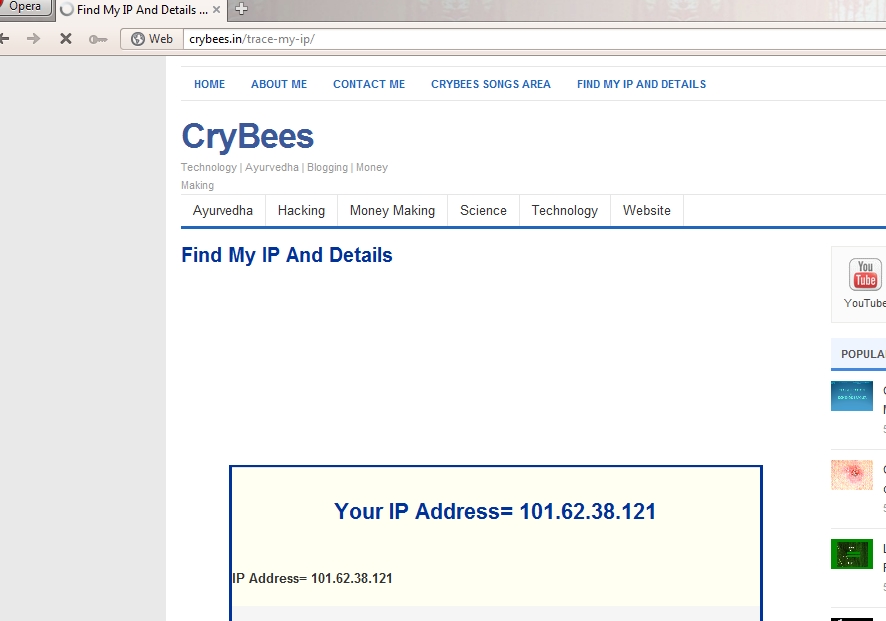
CryBees IP Adrees Finder Just Check Our Site How Working With This Api
The Data Will give full Details about that ip address. Simple 2 php code are behind this process . Simple process.

</p>
<p><!--?php <br ?--> $ip=$_SERVER['REMOTE_ADDR']; // This Will Find your IP Address<br />
echo "<strong>IP Address= $ip</strong>"; // This Will publish Your IP Address<br />
$output = shell_exec('whois '.$ip.''); // This Service Check Your Details Of your given IP<br />
echo "<br />
IP Adress Detail= $output<br />
"; // This Will Publish Your Report.</p>
<p>?><br />
Save File- crybees.css
<br />
body<br />
{<br />
 color: #000000;<br />
 font-family: Georgia, Arial, Sans-Serif;<br />
 background-color: #ffffff;</p>
<p>}</p>
<p>h1<br />
{<br />
 color: #003399;<br />
 }</p>
<p>td<br />
{<br />
 vertical-align: top;<br />
}<br />
table.crybees<br />
{<br />
 width: 650px;<br />
 background-color:#FFFFF2;<br />
 border: medium solid #003399;<br />
}</p>
<p>
Save File as index.php
</pre><br />
CryBees IP Finder<br />
<h1 align="center"><!--?php $ip=$_SERVER['REMOTE_ADDR'];<br ?--> echo "<strong>Your IP Address= $ip</strong>"; ?></h1><br />
echo "<strong>IP Address= $ip</strong>";<br />
$output = shell_exec('whois '.$ip.'');<br />
echo "<br />
<pre>IP Adress Detail= $output</pre><br />
"; ?><br />
<table class="crybees" border="1" cellspacing="0" cellpadding="0" align="center"><!--?php $ip=$_SERVER['REMOTE_ADDR'];<br ?--></table><br />
How Processing? – Click The Link – CryBees IP FInder
Downlaod CryBees IP Adress Finder Full API In Single click